

Tom and I get asked constantly which award search tool to start with, and PointsYeah is usually my answer for anyone brand new to this. It’s fast, it’s free to start, and it doesn’t throw you into the deep end the way some of the more advanced tools do.
If you’ve got points sitting in an account and no idea how to actually find a seat, here’s exactly how I’d walk you through it.
What PointsYeah Actually Does
PointsYeah searches live award availability across roughly 22 airline programs, plus hotel and bank point programs, and returns results in under 20 seconds. That speed is the first thing you notice. Instead of checking airline websites one at a time, you get a side-by-side view of where your points can actually get you.
Step 1: Create Your Account
Sign up is free and only needs an email address. No credit card, no commitment. I’d recommend starting here even before you’ve settled on which card or program to focus on, seeing real award availability changes how you think about which points are worth chasing.
Step 2: Run Your First Search
Enter your origin, destination, and travel dates the same way you would on any flight search site. PointsYeah checks a 4-day window around your dates on the free version, and shows you results across every program it covers at once, points needed, which programs you can book through, and any relevant transfer partners.
A few things worth doing on your first search:
- Search a range of dates instead of one fixed day, availability often opens a few days on either side
- Filter by cabin class early if you’re specifically hunting business or first class seats
- Note which transferable points programs show up, Amex, Chase, Citi, and Capital One all connect through PointsYeah, so this tells you where to focus your points
Step 3: Try Daydream Explorer
This is the feature that got me hooked. Instead of picking a destination and hoping something’s available, Daydream Explorer flips it around, you tell it a departure city and it shows you everywhere your points could take you. Type “anywhere” as your destination and you’ll get a full list of redemptions worldwide. It’s genuinely one of the best ways to find a deal you weren’t even looking for.
Step 4: Set Alerts for Routes You’re Watching
If a route you want isn’t showing availability yet, set an alert instead of manually rechecking every few days. PointsYeah will notify you the moment something opens up or a price drops. The free version gives you a handful of alerts, plenty to start with if you’re only tracking one or two trips at a time.
Free vs. Premium: Do You Need to Upgrade
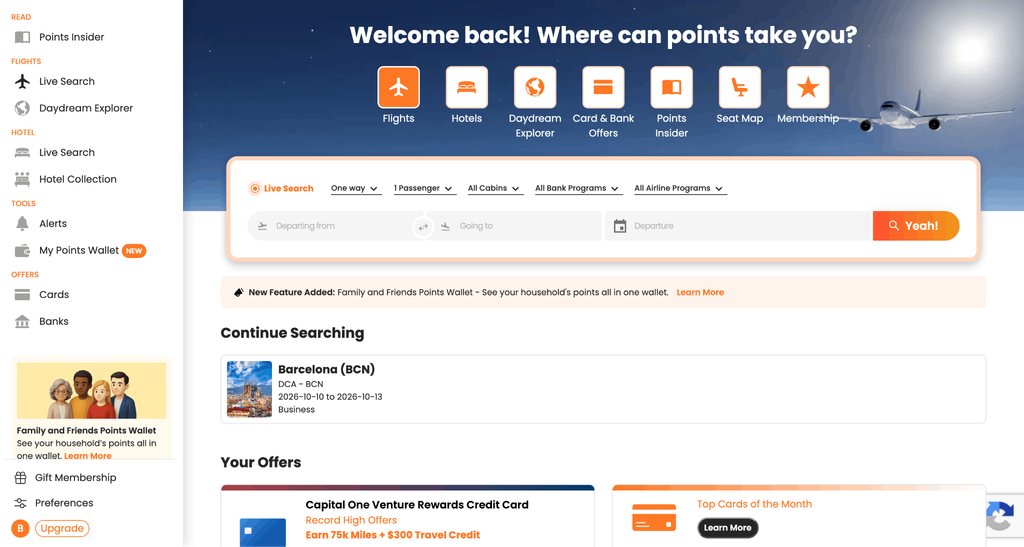
The free version covers most beginners completely, a 4-day search window, several alerts, and full access to Daydream Explorer. Premium runs $99.99 a year or $11.99 a month and extends your search window to 8 days, adds multi-airport searching, and bumps your alert count up significantly.
I’d hold off on upgrading until you’ve used the free version for a few searches and hit an actual limitation, most people don’t need Premium right away, and it’s easy to add later once you know you’ll use it.
How PointsYeah Fits Into a Bigger Toolkit
PointsYeah is a great starting point, but it’s not the only tool worth having once you get further into this hobby.
I’ve compared it against other options in the best tools for maximizing points and miles, and once you’re comfortable with the basics, my Seats.aero review covers a more advanced tool worth graduating to. If you want another beginner-friendly option to compare against, my Roame guide covers similar ground with a slightly different approach.
The Bottom Line
PointsYeah gets you from “I have points and no idea what to do with them” to an actual booked award seat faster than almost any other tool I’ve used, and it does it without costing you anything to start. Create the account, run a search, try Daydream Explorer, and set an alert on anything you’re not ready to book yet.
Lisa ✈️